View Ball Fix
Thanks for helping out, jellejurre!
A tool to calibrate your avatar’s viewpoint
This tool helps you with making sure what you see in the editor (outside of play mode) is the exact view point you will get to use, when using your avatar on VRChat.
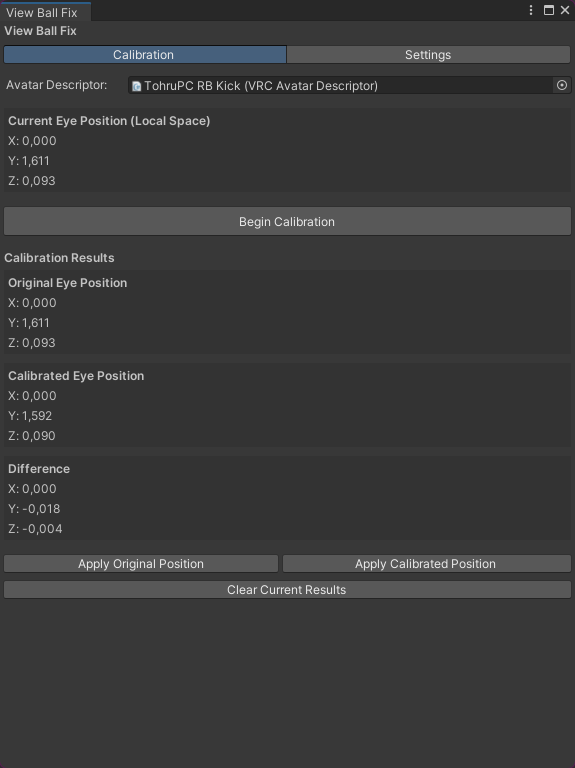
Steps to follow for calibration:
- Install View Ball Fix
- Install Av3 Emulator / Gesture Manager
- Add either Av3 Emulator or Gesture Manager to the scene
- Open
TohruTheDragon/View Ball Fix - Drag your avatar from your hierarchy, into the
Avatar Descriptorfield - Make sure you have either Av3 Emulator or Gesture Manager in your scene
- Click
Begin Calibration - Make sure the Game View window is visible while calibrating, then wait until it finishes, and you are back to Edit mode.
- Apply the new position by clicking the
Apply Calibrated Positionbutton
Optional steps: - If the viewpoint is still off to the side, go to the
Settingstab of the tool and enableDebug mode - Click
Apply Calibrated (with X) - If you are unhappy with the view position for some reason, either use the
Apply Original Positionbutton, or set the viewball back manually in the avatar’s descriptor
WARNING: Do NOT calibrate again, while a calibrated position is already set on your avatar, as this will get you bad view position values.
Download the latest release here: Link
Or get it via VCC: Link
パッケージ名
com.tohruthedragon.viewballfix
ドキュメント
未設定
リポジトリ
- TohruTheDragon's VPM Packages (2 バージョン)
バージョン
1.0.1
Unityバージョン
未設定
依存関係
なし
VPM依存関係
旧パッケージ
なし
ライセンス
未設定
作者
TohruTheDragon