Timeline Beat Marker
English | 日本語
Overview
Timeline Beat Marker is a Unity editor extension that adds beat markers to a Timeline. It places markers at the beat intervals specified by the BPM, making it easier to place events in sync with the music rhythm.
Installation
You can add Timeline Beat Marker to your project using any of the following methods.
Install via Git URL (UPM)
- Open Window > Package Manager in Unity.
- Click the + button in the upper-left corner and select Add package from git URL….
- Enter the following URL and click Add:
https://github.com/raii-x/timeline-beat-marker.gitInstall via OpenUPM
- If you don’t have the OpenUPM CLI installed, refer to the OpenUPM documentation to install it.
- Run the following command in your terminal to add Timeline Beat Marker to your project:
openupm add com.fracfloor.timeline-beat-markerInstall via .unitypackage
- Go to the Releases page and download the latest
.unitypackagefile. - Open your project in Unity and select Assets > Import Package > Custom Package, then import the downloaded package file.
Install via VRChat Creator Companion
If you are using this in a VRChat project, you can also install it via VRChat Creator Companion.
- If you haven’t added
raiito VRChat Creator Companion, go to raii’s VPM Listings and click the Add to VCC button. - Open Manage Project for your project in VRChat Creator Companion.
- Type
Timeline Beat Markerin the Search Packages… box and click the + button on the package to install it.
Opening the Window
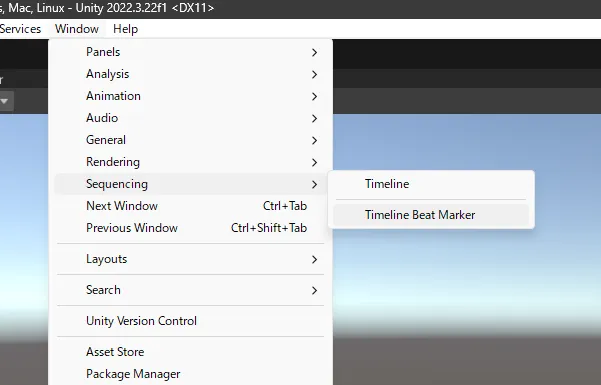
Go to Window > Sequencing > Timeline Beat Marker in the Unity menu bar.
Window Reference
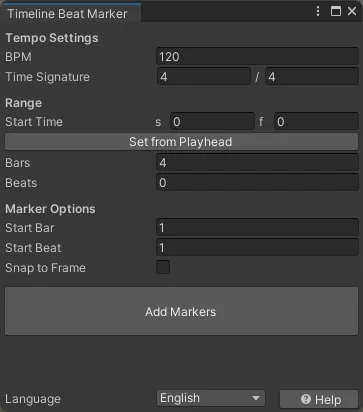
Tempo Settings
| Field | Description |
|---|---|
| BPM | Tempo in beats per minute |
| Time Signature | The time signature of the music, specified as numerator / denominator |
Range
| Field | Description |
|---|---|
| Start Time | The time position where the first marker will be placed (s is seconds; the f is frames based on the Timeline’s frame rate) |
| Set from Playhead | Sets the Start Time to the current playhead position in the Timeline window |
| Bars | The number of full bars of markers to place |
| Beats | Additional beats to place after the full bars |
Marker Options
| Field | Description |
|---|---|
| Start Bar | The bar number assigned to the first marker |
| Start Beat | The beat number assigned to the first marker |
| Snap to Frame | Snaps each marker’s time to the nearest frame based on the Timeline’s frame rate |
Add Markers
A Timeline asset must be open in the Timeline window for the Add Markers button to be enabled.
Click the Add Markers button to place beat markers on the currently inspected Timeline asset’s marker track.
If a beat marker already exists at the same time position, it will be overwritten by the new marker.
Marker Display
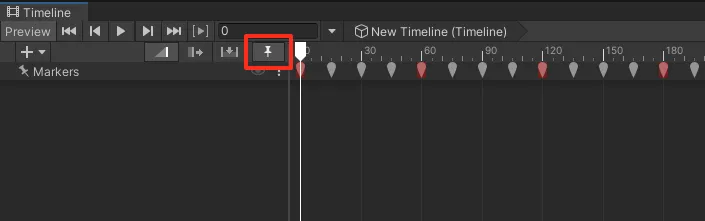
Once placed, beat markers appear on the Timeline’s marker track.
Clicking the Timeline Markers toggle (the pin icon highlighted in the image) to expand the marker track enables events on the Timeline to snap to the markers. This makes it easier to place events in sync with the music rhythm.
Each marker has a tooltip showing its position in bar.beat format. Markers on beat 1 of each bar are highlighted in red.
Links
パッケージ名
com.fracfloor.timeline-beat-marker
ドキュメント
https://github.com/raii-x/timeline-beat-marker
リポジトリ
- raii (1 バージョン)
バージョン
1.0.0 (変更履歴)
Unityバージョン
2022.3 以降
依存関係
VPM依存関係
なし
旧パッケージ
なし
ライセンス
https://github.com/raii-x/timeline-beat-marker/blob/main/LICENSE